



Monroe Systems for Business
Monroe AR12225 2 1/4" x 150' Exclusive 20 Lb. Single-Ply Paper Rolls (12-Rolls)
Description
12-Pack of Monroe's 2 ¼" x 150' Premium Single-Ply Paper Rolls
Experience the superior quality of Monroe AR12225 2 1/4" x 150' Exclusive 20 Lb. Single-Ply Paper Rolls. As the industry's thickest paper stock, these premium single-ply paper rolls are exclusively created by Monroe, a trusted name in the business since 1912. Each roll measures 2 ¼" x 150', providing an ideal surface for clear printing from your ink ribbons.
These rolls are universally compatible with any machine that can accommodate a 2 ¼" x 150' roll, including printing calculators, adding machines, POS systems, and cash registers. This 12-pack of white, single-ply paper rolls is the only 20 lb. premium single-ply paper roll on the market, offering unparalleled quality and performance. Choose Monroe for all your calculator and paper roll needs.
Those who know, choose Monroe.
- Paper Size: 2 ¼" x 150'
- Color: White
- 12-pack single-ply paper rolls
- Only 20 lb. premium single-ply paper roll on the market
- Provides ideal surface for clear printing of ink ribbons
- Replacement for 2 ¼" Paper Tape Rolls
This premium paper roll is compatible with printing calculators, adding machines, POS systems, and any other device that takes a 2 ¼" x 150' paper roll.
If you previously bought the MA40187, we are no longer selling this product in cases of 50. However, this is the same product and is available in quantities of 12.
|
|
|
|
|
|---|---|---|---|
|
This premium add roll is compatible with printing calculators, adding machines, POS systems, cash registers, and any other device that takes a 2 ¼" X 150 paper roll.
|
This is a Monroe exclusive, high-quality 20 lb. 2 ¼" X 150' single-ply bond paper roll. This paper provides the perfect surface for clear printing from your ink ribbons.
|
These are the ideal paper length so you're not having to change the paper as frequently as you might with rolls at a fraction of the length.
|
Exclusively made by Monroe Systems for Business, the inventor of the printing calculator in 1912. Those who know, choose Monroe.
|




How to Install Monroe Paper Rolls into a Monroe Printing Calculator
|
|
|
|
|
|---|---|---|---|
Step 1Turn OFF the calculator. Slide the printer cover off of the device. Put pressure on the cover at the top of the device, pushing off the cover. Take note of the arms holding the paper roll in place. You'll need to remove the paper roll core from the previous roll that you are replacing for a new paper roll. | Step 2Install the new paper roll.* Make sure that the paper sits so the paper is feeding up towards the sky and not down toward the ground. This will help keep the paper curling toward the back of the machine when you print. | Step 3Now it is time to feed the printer paper into the printer. Look for a slot along the top-rear of the printer. Then, feed the paper between the slot in the printer. Turn ON the calculator. Press the "FEED" button on the printer so the paper continues to be fed through the device properly. | *NotesDepending on the model calculator you may need to have the calculator lid installed before feeding the paper through the printer. For the Monroe 6120X, 2020PlusX, and 122PDX lids must be installed before feeding the paper. For the Monroe 8130X, 8145X, and UltimateX the lid does not need to be installed until afterwards. |


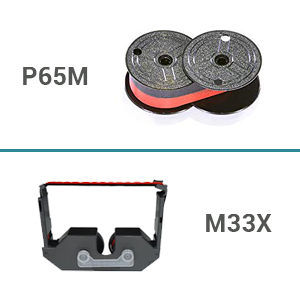
For optimal printing results, we recommend using the Monroe P65M, a universal ribbon, or the M33X ribbon cartridges that work across the entire Monroe X Series line of printing calculators. Choose Monroe for all your calculator and paper roll needs. Those who know, choose Monroe.
 |
 |